Alpy — free ski app
A first ski day with Alpy, start to finish
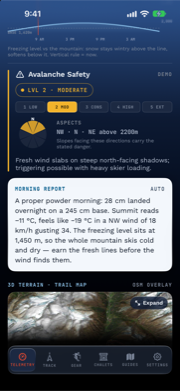
This is the walkthrough I wish every app had: not a feature list, but what actually happens on a ski day, hour by hour. I built Alpy, so read this as the maker’s intended path through it — then bend it to your own day.
7:00 — the morning report
Open the app and the Telemetry page is already a cockpit: summit temperature with feels-like, overnight snowfall, base depth, wind and gusts, and the freeze-level curve — a line showing exactly which altitudes stay wintry today and which turn soft after lunch. If there’s an avalanche bulletin for your region, it’s there with the EAWS danger level, and when the bulletin names dangerous slope aspects, a compass rose shades them in.
Below that, a morning report in prose. On recent iPhones it’s written by Apple Intelligence on your phone — the AI never invents a number; it rephrases the measured ones above it, and the card says which voice wrote it.
7:40 — deciding where to go
The trail map opens on a 3D winter mountain: real terrain, snow-white with relief shading, and the resort’s actual piste network drawn over it in difficulty colors — at Zermatt that’s 134 km of runs from OpenStreetMap. Tap a run in the list and it lights up on the mountain while the camera flies to it. One tap switches to a flat paper chart when you just want the diagram.
9:00 — Start Tracking
One button. From here the app measures your day: runs and lifts are detected automatically from altitude trends, so there’s nothing to start or stop at the top of each run. The live cockpit shows your speed, the drop of the current run, and — if you’ve skied a named run before — a live ghost race against your own best time, with the gap shown like a race timing board.
While you ride the lift, the app quietly estimates how long you stood in the line (standing-still GPS just before boarding), and if a bulletin is active, your debrief will flag any run whose course pointed into the named aspects.
12:30 — the glance test
On the hill, the useful screen is the one you can read in three seconds with gloves on. Big numerals, no menus. If your battery drops to 10%, the app stops tracking and saves the day before iOS can kill it — a trick we borrowed, with credit, from the apps that learned it the hard way.
16:30 — last run
If the day runs long, a chip appears while tracking: sunset time and minutes of light left, counted from the resort’s actual forecast sunset. It states the fact; the call is yours.
17:00 — the debrief
Stop tracking and the day becomes three things:
- A replay — your line drawn over the 3D winter terrain, with a chase camera that follows your dot down each run at up to 32×, and your ghost alongside where you’ve skied the run before.
- A debrief — every run as a register entry: time, drop, top and average speed, estimated turns, airtime. Lift-line totals per lift. Personal records with the margin you beat them by.
- A written summary — a coach-style paragraph built strictly from your measured numbers: descent rate, time-on-snow, the standout run, consistency. On-device AI again, and labeled.
What never happens
No account was created. No GPS point left the phone. Nothing was uploaded, because there is no server to upload to. That’s not a settings toggle — it’s the architecture.
Alpy is free on the App Store — no subscription, no ads. If you try it for a first day, the season-opening checklist pairs well with it.