Alpy — free ski app
Trail Finder: point your phone at the mountain
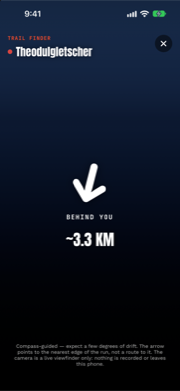
You’re standing at a junction of four pistes in flat light, the signpost is rimed over, and the run you wanted is… somewhere. Trail Finder is Alpy’s answer: pick a run on the trail map, tap Find, and point your phone at the mountain. A live arrow swings toward the run’s nearest edge over your camera view — “AHEAD · ~340 M” — and keeps pointing as you turn.
How it actually works
No magic: your GPS position, the run’s real OpenStreetMap geometry, and the phone’s compass. The app computes the bearing from you to the nearest point of the run (a named run is often several mapped segments; it picks the closest), compares it with the direction you’re facing, and rotates the arrow by the difference. Face within about 25° of the run and the arrow locks “AHEAD” in red; face away and it says so plainly: “BEHIND YOU.”
What we refused to build
The obvious flashy version is an augmented-reality line painted on the snow, showing the run snaking down the face. We tested the idea against physics and said no. A phone compass is honest to roughly 5–10 degrees in the field — at 500 m that’s a line drawn up to 50 m sideways, which means the “painted run” can sit on the neighboring piste. An arrow is robust to that error; a painted line pretending to centimeter accuracy is a lie wearing good graphics.
The HUD says this on screen: compass-guided, expect a few degrees of drift; the arrow points to the nearest edge of the run, not a route to it. Terrain between you and that edge is yours to judge.
The camera never records
The viewfinder is exactly that. The camera session in Trail Finder has no recording output attached — frames go to your screen and physically nowhere else. No photo, no video, no analysis, no upload. That’s stated in the privacy policy and enforced by the code’s architecture, not by a promise.
When it’s most useful
- Junctions in fog or flat light, when signage fails.
- Finding the entrance of a run you’ve only seen on the map.
- Orienting after a lift you’ve never ridden — point the phone, sweep, and the arrow tells you which side of the ridge your run is.
It’s a small tool with one honest job. Pick a run, tap Find, trust the arrow within a handful of degrees — and keep your eyes on the mountain, not the phone.
Trail Finder is in Alpy, free. It pairs with the 3D winter map the run was picked from.