Alpy — free ski app
Using the 3D winter map: a field guide
We wrote up how the 3D winter mountain was built; this is the companion piece — how to use it on an actual ski day.
The first three seconds
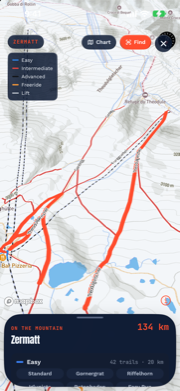
Open the trail map and the camera drops from a high overview into a pitched panorama, looking up the mountain the way a paper resort poster does. What you’re seeing: real elevation (gently exaggerated 1.3× so valleys read at a glance), relief shading over snow-white terrain, contour lines, and the resort’s real OpenStreetMap piste network — white-cased runs in standard difficulty colors, dashed lifts, names set along the lines like a cartographer would.
Pinch, rotate, and tilt are all live. Everything your fingers expect from a modern map works on the mountain itself.
Finding a run
Open the run list (it rides over the map as a sheet) and tap any named run. Two things happen: the run glows on the terrain, and the camera flies to frame it. This answers the question trail maps are actually for — where is that, relative to me? — in one tap. Tap Find next and the Trail Finder takes over with a camera arrow.
The orbit tour
The Tour button sets the mountain slowly rotating — a full lap of the resort at a cinematic pace. It’s partly for planning (you see every face of the terrain) and partly, honestly, because mountains are beautiful. Grab the map at any point and it hands control straight back to you.
The paper chart is still there
One toggle flips to the schematic chart: the same piste network drawn flat on paper, north up, no terrain. Some decisions want the mountain; some want the diagram. Connection-free days favor the chart too — it renders entirely from cached data.
What the winter styling means
The base cartography is restyled at load time: land turns snowpack white, water keeps its blue, and the relief shading carries the shape. This is a reading choice, not decoration — on white terrain your eye goes to exactly two things, the shape of the mountain and the colored runs on it, which is the entire job of a ski map.
Two honest notes. Map tiles stream from Mapbox’s servers (the one part of Alpy that talks to a map provider; the privacy policy covers it, and telemetry is switched off). And the terrain model is a summer scan wearing winter styling — it shows the mountain’s shape, not today’s snow cover. For today’s snow, the Telemetry page’s freeze curve and snow numbers are the measured truth.
The 3D map is on the Telemetry tab behind the trail-map card’s Expand button — in Alpy, free.